Posts

Showing posts with the label sharepoint 2010

SharePoint 2010 - Automate Site & Group Creation with Nintex Workflow 2010

Image
What Nintex Workflow has an action to create a site automatically in SharePoint, but it's functionality is quite limited.  You can't create groups and you can't add staff to those groups.  This tutorial shows you how to create a Nintex workflow to automate the whole process using SharePoint Web Services. Why As most SharePoint administrators are aware, it's ALWAYS a bad idea to give staff the ability to create SharePoint sites.  They will end up creating them for the wrong purposes, will not maintain them, no retention policies will get assigned to them, etc. However, you don't want to restrict your users creative freedom.  You want to govern it in a manageable way. In order to keep track of all your SharePoint sites, we need to ensure that when we allow staff to create sites/content, it is being properly tagged with the right information.  As long as you are logging & tagging sites with extra data, you can easily govern and manage those sites far i...

SharePoint 2010 - Retrieve the Permission Mask Values for a Site using Powershell

This article stems from another article explaining how to  Automate Site & Group Creation with Nintex Workflow 2010 What Use Powershell to retrieve detailed data about the permission levels on a particular site Why I was looking for a way to automate Site & Group creation using nintex workflows.  In order to create groups, you need to call a SharePoint Web Service.  That Web Service requires an input value called 'permissionMask (int)'. This powershell script will allow you to find the correct permission Mask related to your particular environment & permission levels. How Jump onto your WFE, open up SharePoint Powershell as admin and paste in the following code (with the site you wish to retrieve data for: ## Get site permissions using SharePoint 2010 web service in powershell $uri=" http://rootsite/subsite /_vti_bin/Permissions.asmx?wsdl"  ## $siteName is a string which contains the site name for which you need to get the permissions [St...

Nintex Workflow - How To Set a DateTime field to Current Date AND Time

Image
What:  Surprisingly had some trouble with this simple task, so here's how you can avoid wasting 20 minutes of your life.  If you have a list column that is of type Date AND Time, it can be difficult to set it to the current date and time inside a workflow. Why:  You might like to do this if you were logging changes to items to a separate list for reporting on later. How (quick): Create a string variable called 'CurrentDateTime', set the string variable to equal 'CurrentDate[space]CurrentTime'.  Set your DateTime list column to equal the workflow variable CurrentDateTime. How (detailed): Create a Workflow Variable called ' CurrentDateTime ' of type ' Single line of text ' Create a 'Set Variable' step and set CurrentDateTime to equal value: Current Date[space]Current Time (these two values can be found under common variables tab). Update the field on the list item to equal the Workflow variable you just set.  In my ...

SharePoint 2010 - Powershell Script to Disable Versioning on a specific List & Delete Old Versions

This will remove versioning from the list you specify & update every item so that the old versions are deleted. Great for really large lists/libraries that don't require versioning when you want to free up some space. $web = get-spweb "http://root/site" $list = $web.Lists["List Name"] $list.EnableVersioning = $false $list.Update() foreach($item in $list.Items) { $item.URL; $item.SystemUpdate(); }

Issue with Embedding Yammer Feed in SharePoint 2010

Image
On the 14th of May 2015, Yammer deployed an update to their Embed Yammer Feed script that stopped any Yammer Feeds on SharePoint 2010 from working.  In our case, the Yammer Feed got stuck on 'Loading...' This error that is causing the Yammer Feed to fail to load is: Object doesn't support property or method 'forEach' .  yam-platform-feed-57f4f449766511e4f91eb519a39b2781.js, line 480 character 19099 The reason this is happening is because SharePoint Master pages have a line of code which forces all Internet Explorer Browsers to run in IE8 Compatibility Mode.  This is done to ensure all the ribbon & SharePoint functionality continues to work on new browsers. The line of code in question:  <meta http-equiv="X-UA-Compatible" content="IE=8"/> Hint: don't just remove this line of code!  you'll cause yourself a headache. The line that Yammer & Microsoft are taking is that if you plan to stick to SharePoint 2010, th...

SharePoint Farm Freezing, Becomes Unusable Without An IISReset - A Lesson In Item-Level Permissions

Recently I was working with a client who's SharePoint 2010 environment had been poorly managed for years.  They had a single site collection on a single, large content database (650GB).  Not uncommon, however this environment also occasionally froze up, never loading any of the pages on any sites until an IISRESET was performed on the Web Front End (WFE). It started off only happening once a month, then moved to once a week, a few times a week, to 5-10 times a day... Begin Troubleshooting: The issue was around too many lists, and items within those lists having their own permissions. Each permission for an item counts as one row in the RoleAssignment table in the database. apparently they say a healthy DB will only have 200,000 rows in that table. Ours had 10,000,000 rows (You can check this by right-clicking the Database in SQL Management Studio and clicking Reports > Disk Usage by Top Tables.  Then look for the RoleAssignment Table).  and every time...

Use InfoPath 2010 to Query an Oracle Database via a Custom Web Service in SharePoint 2010

Wow that's a long heading...  Let me explain how this is done, and why this path was chosen out of all the options. THE OPTIONS Still to come... SETTING UP There's quite a few large steps to get this done, so I'll split it into the following sections, ensuring we test along the way to make sure we haven't missed a step: Install & Configure Oracle Client on Web Server Create custom Web Service in Visual Studio Deploy Web Service to IIS Build InfoPath Form Configure InfoPath Services Deploy InfoPath Form to SharePoint Environment Install & Configure Oracle Client on Web Server Ask your Oracle DBA what version of Oracle the database is running on. Navigate here and download the corresponding Client (for this excercise get the 32-bit version if its an option):  http://www.oracle.com/technetwork/database/enterprise-edition/downloads/index.html Copy to the IIS Server (Web Front End) Extract and install, here's the settings I used for the i...

SharePoint 2010 - Export to Spreadsheet Action Missing on Survey Overview Page

Most people can't find the 'Export to Spreadsheet' option from the Action drop-down menu due to not being on the Overview.aspx page. But if you've modified the Overview page via SharePoint Designer, then you've probably lost the Overview menu completely The solution is to create a New List View via SharePoint Designer and set it as Default (crucial!). Done. If you don't set the new view as the default page, then the Export option will still be missing.

SharePoint - Field type [FieldName] is not installed properly. Go to the list settings page to delete this field.

Sorry, something went wrong Field type [FieldName]  is not installed properly. Go to the list settings page to delete this field.   This is caused when a FieldType has been created usually via a custom solution (WSP), and has been used somewhere, then uninstalled while still being used somewhere on the Site Collection.  This error message is similar on all versions of SharePoint 2007/2010/2013. Usually you will have one or more Site Columns that are using the FieldType, and possibly one or more Content Types that are using that Site Column, and then most likely one or more Lists/Librarires using the Site Columns or Site Content Types. If you want to remove the Field Type Completely, steps to resolve are as follows: Try to delete the Site Column or Content Type from every list it is being used on.  If you can't delete the Content Type from the list, you will have to delete the list. Delete the Content Types using the Site Column (Site Actions >...

InfoPath 2010 - How Do I Deploy InfoPath Forms & Updates to SharePoint

Image
Deploying an InfoPath form Once you have developed your InfoPath form, most likely you will need to deploy/publish it to SharePoint so that the information can be stored and reported on.  There are different methods for deployment, which are also dependent on whether you are publishing a fresh form, or updating an old form. Two methods of Deploying/Publishing Forms When it comes time to deploy your form to SharePoint, there are two different methods with reasons for and against why and when you would use each.  You can publish the form as a Form Library, or as a SharePoint Content Type. Deployment Method 1:  As a Form Library When you publish a form as a Form Library, it will create the library on the SharePoint Site of your choosing, and a copy of the form template can be found here:  http://rootsite/formlibrary/forms/template.xsn Use this method when you only require one library for the forms and the forms do not get consumed by BizTalk for some ...

SharePoint 2010 - Items Added By Anonymous Users Cannot Start Workflows

Image
On a public-facing website on SharePoint 2010, I was building a simple list to be used as the Contact Us form, so that when an item is added to the list, a workflow will run which sends an email to the owner of the website. It all worked fine until I tested as an anonymous user that wasn't logged in.  I could create the item fine, but the workflow would not run.  The reason for this is, when an item is created by an anonymous user, the item does not set an author against itself (created by, modified by), which means the Workflow does not know what permissions it should use to run. Turns out there's really only one way to get around this.  Open up your old mate Visual Studio and create an Event Receiver on the ItemAdded event.  What needs to happen is as soon as the item is added to the list, the event receiver will grab the item, and set the Author value to something generic (I used the System Account), then run the workflow. (code in text at the bottom of thi...

SharePoint 2010 - Calendar with multiple resources and Double Booking prevention

So I know this is an OOTB feature, but I'd been looking for exactly this solution for (let's be honest) quite a while. A SharePoint Calendar with which you can book items/resources like projectors, laptops, meeting rooms, etc.  A calendar that also checks whether that resource has already been booked on that specific date and time. Anyway, There is an official Microsoft article at the bottom of this post, but because it took me so long to find, I'm duplicating it: 1.  Activate the 'Group Work Lists' Feature for the Site. 2.  Enable'Resource Reservation' in the Calendar List Settings > Title, Description and Navigation 3.  Ad resources to the 'Resource List' that would have been created when you enabled the Group Work Lists Feature 4.  Use Calendar 5. Profit Official Article: http://office.microsoft.com/en-au/sharepoint-server-help/enable-reservation-of-resources-in-a-calendar-HA101810595.aspx

SharePoint 2010 - Publishing Site 'Pages Library' no-no

Earlier today I wanted to modify the address of the 'Pages' library on a SharePoint 2010 site.  The reason behind this was to make the naming of the folders more user friendly for our developers who would be deploying reports there. There wasn't a way to do it from the standard GUI, so I decided to modify it in SharePoint Designer (Hey, if SP Designer allows you to do it via GUI, it's safe right? ... right!?). Bad move, as there's some behind the scenes magic that must be hard-coded to the Pages URL, which breaks the Navigation Settings page (this one: http://[sitecollection]/_layouts/AreaNavigationSettings.aspx). 'An Unknown Error has Occurred' - Great.. I'm sure there would be a way around it, but for the sake of saving a few hours of investigation, don't change the name of your Pages Library! Ciao ciao!

SharePoint 2010 - People Picker that is showing the wrong user profile information

Hi again, introduction to this issue:  Someone has updated information on their MySite but their details have not propagated through to the People Picker, or any list that shows User Information in it. Why:  This is due to the User Information List , which is used to supply User Information to all the SharePoint functions that use it.  The User Information List only seems to get updated when a user is first introduced to a Site Collection.  Not even a full Profile Sync will fix it. (You can find the User Information List here: http://[rootsite]/_layouts/people.aspx?MembershipGroupId=0).  This issue has been documented before and done very nicely on Gary's blog here:  http://blog.falchionconsulting.com/index.php/2011/12/updating-sharepoint-2010-user-information/ The difference is between Gary's blog post and mine, is that his shows how to get a script to iterate through every Web Application and update specific fields.  Where as I will be sh...

SharePoint 2010 - Copy documents across libraries while keeping Versioning

I've recently been looking into a good Document Management solution using OOTB SharePoint 2010 functionality.  I'll explain my solution that should cover ISO in another post, but here I'd like to explain another issue I had with moving files from one Document Library to another while keeping all the version history. The only way I've found to keep all the version history is to make both libraries identical, then to open both libraries with File Explorer & move the files to the second Library.  Alternatively, you can use the 'Manage Content & Structure' area to move them as well. If you are like me, you have some trust issues with Microsoft at times, and don't want to risk moving the files and all their information if it doesn't work! So here's the easiest (oh god) way I found to do it safely. Export (Backup) a copy of the Document Library containing all the data you wish to transfer: Export-SPWeb -Identity "http://[servername]...

SharePoint 2010 - When [Today] just isn't your day

Sometimes your SharePoint environment doesn't want to play ball with OOTB features, so if you like me have once had an issue with the [Today] option not working on list filters, here is the slower but successful way of getting it to work: Create the view using CAML Query in SharePoint Designer 2010. The CAML equivalent of [Today] is: <Value Type="DateTime"><Today/></Value> Or if you want to be a few days ahead or behind today <Value Type="DateTime"><Today OffsetDays="-31"/></Value> Cheers, The Baretta

SharePoint 2010 - List View Threshold

Image
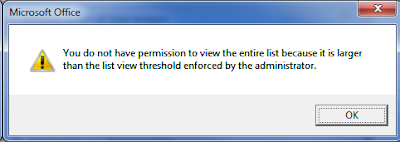
Any well utilised SharePoint farm will hit this limit at one point or another, the annoying but not hard to resolve LIST VIEW THRESHOLD ISSUE!!!!!! If you're on the ball, you'll know to cater for this when first creating a list you know is going to be quite popular with the lads.  This involves creating indexed columns, and creating views that filter on the indexed columns. But woe to those who wait for the dreadful message to appear, and also to those who prepared for it, but it is still occurring anyway.   WHHHHHHYYYYYYYYYYYYYYYYYYY!!!!!!!!!!!!.... STOP!  CAML TIME! Well it's because when you modify a view using the SharePoint GUI, and you filter on a indexed column and maybe a few others, SharePoint turns your filters & options into a CAML query, and if that query contained a few different column filters, SharePoint occasionally doesn't render the CAML query in a manner that ensures you are always querying less than the List View Threshold! OH N...

SharePoint 2010 - SQL Server 2012 Reporting Services Integration Steps (Multiple Server Farm)

Most SharePoint customers suffer no issues when integrating SQL Server Reporting Services 2012 (SSRS 2012) with SharePoint 2010 (SP 2010), I however, had quite a bit of trouble.  So for those at home who may also be having some trouble, I thought I'd prescibe you some troubleshooting medicine along with a few spoonfuls of errors. The official steps you may have read about: - Install SQL Server with Reporting Services Add-in for SharePoint - Install SharePoint on the Reporting Services Server and connect that server up to the farm (using Configuration Wizard) - Install the rsSharePoint.msi file provided by Microsoft on all your front-end servers running SharePoint. - Run these two commands on all front-end servers running sharepoint Install-SPRSService Install-SPRSServiceProxy - Navigate to Central Administration > System Settings > Manage services on server.  Start the SQL Server Reporting Services Service - Navigate to Central Administration > Applic...

SharePoint 2010 Enterprise Features & CALS

You've just been told that despite having a SharePoint 2010 Enterprise licence, your users also need a Standard CAL + Enterprise CAL.  Shit! Step 1:   Review whether you use any enterprise features.  and if so, review which sites you need them to stay if any.   http://sharepoint.microsoft.com/en-us/buy/Pages/Editions-Comparison.aspx What do all those features enable exactly??  Infopath Forms Services might not mean that you can't use Infopath with SharePoint if you dont have enterprise, it may simply mean that you can't use Infopath INSIDE a browser.  So if your users have InfoPath installed on their local computer, then it's not an issue disabling Enterprise features. Step 2:  If you don't need Enterprise features, and need to disable them because of licensing issues: Disable in Central Admin:  Manage Web Applications > Manage Features > Deactivate  SharePoint Server Enterprise Web application features on each Web Application....

SharePoint 2010 - RSS Viewer Web Part - Customise the style

For the last few days I've been looking for an example on how to customise SharePoint 2010's OOTB RSS Viewer Web Part, and finally I've found a solution that although it has quite a few steps, the final result is clean code with the ability to use CSS to style the Feed. http://zioed.wordpress.com/2012/02/24/customizing-the-sharepoint-2010-rss-viewer-web-part-part-1-of-a-two-part-post-2/ Thank you Ed. To add to Ed's fantastic post, I will show you a method to create styled RSS feeds without SharePoint Designer.  Once you have found an RSS feed that you would like to manipulate, add the URL to your RSS Viewer Web Part (If you cannot find it in your list of web parts, you need to enable the SharePoint Server Standard Site Collection feature), click Apply, then click the 'XSL Editor...' button.  Copy all of the code into Notepad for ease of editing, and paste it back into the XSL Editor when you are finished. The section of XSL you are looking for is with...