SharePoint Online - Conditional Formatting a Column Between Two Dates using JSON
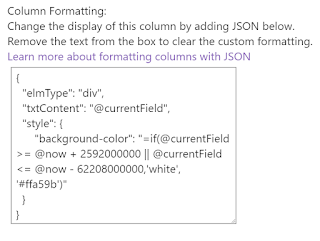
** UPDATE 16/10/2018: In Q4 2018, microsoft are releasing the capability to do this column formatting using the GUI (no code!): https://techcommunity.microsoft.com/t5/Microsoft-SharePoint-Blog/Reinventing-SharePoint-business-process-at-Microsoft-Ignite-2018/ba-p/260444 ** UPDATE 30/08/2018: I initially wrote this blog at the start of august with the old method (see end of post), however thanks to Dave Paylor ( @payl0rd ) I found a new, cleaner method to creating conditional formatting which brought my lines of JSON down from 50 to 7. What Microsoft have plenty of examples on how to implement conditional formatting on a SharePoint list. However my specific needs were: If Date >= [Today] + 30 days Then Background WHITE If Date <= [Today] -2 years Then Background WHITE (This covers any empty fields) Else Background ORANGE Why I was building a list to monitor licence expiry, applying conditional formatting to these date rules meant that I c...