Posts

Showing posts with the label workflow

Microsoft Flow - Create a Teams Message from an RSS Feed

Image
This is a nice simple Flow that I love!  If you work with a lot of different software and want to keep up to date on the latest changes without having to save all those pesky favourites to various RSS feeds/blogs, this is for you. The great thing about this is, when you start posting it to Teams, now everyone can see when there is an update!  It's only 3 steps, here's how: Create a Blank Flow Add the Trigger ' RSS - When a feed item is published ' Add the ' Data Operations - Compose ' action to create a nicely formatted message to send to teams Add the ' Teams - Post a Message ' action, select your team & channel, and put the Compose Output into the Message box I use this flow to keep up to date on all the latest Microsoft PowerApps news, see the screenshot below for my flow setup.

PowerApps - Building a Expanding Gallery with a Expanding Text Box

Image
I recently built a questionnaire PowerApp for a customer.  They had a bunch of questions where the expected answers could be anything from 50-500 words. The problem was when you put too many words into a text box, it gets scroll bars. eww. I'm not against scrollbars for a whole screen, but for text boxes, yeah no. So here's what we did! Added a 'Blank Flexible Height' Gallery to the PowerApp Connected it to my Collection of questions Added a label to display the question Added a text box to collect the answers Set the following text box properties: Mode: Multiline Height:  40 * RoundUp((Len(TextInput1.Text)+0.01) / 90,0) What this does 40 - how tall the text box is each time you meet the character limit for one line 90 - How many characters it takes to move the 40px multiplier up  roundup - ensures the returned number is only ever 1 rounded number.  This means the text box grows in chunks, instead of growing with each individual character type...

Nintex Workflow for O365 - Permission Issue With Custom Task Form

Image
What Product: Nintex Workflow & Forms for O365 Scenario: Create a custom Task Form on an 'Assign a Task' action via the ' Edit Task Form ' option Issue: Staff member does not have sufficient permission to approve task, and is instead provided with the following error message "Item does not exist. It may have been deleted by another user." Why In my case, I checked permissions on the list hosting the workflow AND the Workflow Tasks list to ensure the user had at least Contribute access on both (as per Nintex instructions here ). However the error message continued to appear.  In the end it was because of two things: On the list hosting the workflow, in ' Advanced Settings ' I had set Read Access to ' Read items that were created by the user '.  This was so staff cannot see requests submitted by their colleagues. The moment you edit the task form in Nintex Workflow, the Task Form requests data from the list item r...

Nintex Workflow for O365 - Get Manager Email Address

Image
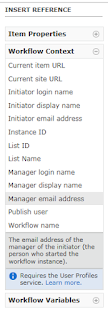
What Nintex Workflow in Office 365 is different from On-Premise, so here's how you can grab a manager's email address. Why If you want to assign a task or email the manager of the person who submitted an item. How Click in the Text Box you would like to add the email address to and using the right-hand navigation menu select Workflow Context > Manager Email Address Reference: https://help.nintex.com/en-US/O365/o365/O365WorkFlow/CreatingWorkflows/Lookups.htm

SharePoint Online - Automate Site & Group Creation with Nintex Workflow O365

Image
What Nintex Workflow for O365 has an action to create a site automatically in SharePoint, but it's functionality is quite limited.  You can't create groups and you can't add staff to those groups.  This tutorial shows you how to create a Nintex workflow to automate the whole process using SharePoint Web Services. Even better, we are going to create the ability to automate Site Creation across multiple Site Collections. If you're looking for a tutorial on how to do this in Nintex Workflow 2010/2013, I've written an article here:  SharePoint 2010 - Automate Site & Group Creation with Nintex Workflow 2010 Why As most SharePoint administrators are aware, it's ALWAYS a bad idea to give staff the ability to create SharePoint sites.  They will end up creating them for the wrong purposes, will not maintain them, no retention policies will get assigned to them, etc. However, you don't want to restrict your users creative freedom.  You want to govern it...

SharePoint Online - Retrieve the Permission Mask Values for a Site using Powershell

This article stems from another article explaining how to [[Automate Site & Group Creation with Nintex Workflow O365]] - Coming Soon What Use Powershell to retrieve detailed data about the permission levels on a particular site Why I had previously created a Nintex Workflow to Automate Site & Group creation using nintex workflow on SharePoint 2010 .  I needed to recreate the same workflow in SharePoint Online / Nintex Workflow O365, however the SharePoint 2010 script for retrieving Permission Mask values did not work. How Using Powershell 3.0 or later, and SharePoint Online Powershell Module.  Open up the SharePoint Online Powershell Module and paste the following code (after updating the variables at the top for your site and admin details): # SharePoint Online - Retrieve the Permission Mask Values for a Site using Powershell # Specifies variable $AdminURI = "https://company-admin.sharepoint.com" $RootSiteCollection="https://company.sharepoint.co...

Gather-Decide-Act: Three Business Process Case Studies That Transform Data Collection Into Inspired Action

On the 28th-29th April 2016, I attended the Digital Workplace Conference in Melbourne.  Here are my notes & thoughts about one of the sessions. Session:  Gather-Decide-Act: Three Business Process Case Studies That Transform Data Collection Into Inspired Action Speaker: Mike Fitzmaurice -  @MikeFitz Session Takeaways: Simple solutions using SharePoint lists and Nintex Forms to gather data easily Nintex Forms allow you to fill out forms in offline mode on a mobile device   Offline mode works like your email outbox.  It holds onto the data until there is an internet connection Mike's theory is that if you show a company how to collect data with a simple form, they will see the value of the solution & be inspired to act on building solutions for their other problems Tip: make data collection as simple as possible.  Don't build complicated forms Nintex Workflow also has the functionality to generate contract documents using the data captur...

Nintex Workflow - How To Set a DateTime field to Current Date AND Time

Image
What:  Surprisingly had some trouble with this simple task, so here's how you can avoid wasting 20 minutes of your life.  If you have a list column that is of type Date AND Time, it can be difficult to set it to the current date and time inside a workflow. Why:  You might like to do this if you were logging changes to items to a separate list for reporting on later. How (quick): Create a string variable called 'CurrentDateTime', set the string variable to equal 'CurrentDate[space]CurrentTime'.  Set your DateTime list column to equal the workflow variable CurrentDateTime. How (detailed): Create a Workflow Variable called ' CurrentDateTime ' of type ' Single line of text ' Create a 'Set Variable' step and set CurrentDateTime to equal value: Current Date[space]Current Time (these two values can be found under common variables tab). Update the field on the list item to equal the Workflow variable you just set.  In my ...

Create Appointment in Nintex Workflow - Finding the right certificate

Error: "The root of the certificate chain is not a trusted root authority" this blog has a very good explanation of why you are receiving the issue: http://blogs.perficient.com/microsoft/2011/03/how-to-create-an-outlook-appointment-using-nintex-workflow-2010/ However, the solution for adding the correct Root Certificate was a bit sloppy in my opinion.  As the script below adds ALL the certificates (which in my case was about 100 of them, very messy!): foreach ($cert in (Get-ChildItem cert:LocalMachineRoot)) { if (!$cert.HasPrivateKey) {New-SPTrustedRootAuthority -Name $cert.Thumbprint -Certificate $cert } } When you only need to add one.  The one it's referencing.  It should be referencing your Outlook Web Access URL (Webmail).  You know, the URL you input in the Appointment Configuration Settings. If that's the case, here's how to download the right certificate and keep a nice clean Certificate List in SharePoint: navigate to your Webmail address cl...

SharePoint 2010 - Items Added By Anonymous Users Cannot Start Workflows

Image
On a public-facing website on SharePoint 2010, I was building a simple list to be used as the Contact Us form, so that when an item is added to the list, a workflow will run which sends an email to the owner of the website. It all worked fine until I tested as an anonymous user that wasn't logged in.  I could create the item fine, but the workflow would not run.  The reason for this is, when an item is created by an anonymous user, the item does not set an author against itself (created by, modified by), which means the Workflow does not know what permissions it should use to run. Turns out there's really only one way to get around this.  Open up your old mate Visual Studio and create an Event Receiver on the ItemAdded event.  What needs to happen is as soon as the item is added to the list, the event receiver will grab the item, and set the Author value to something generic (I used the System Account), then run the workflow. (code in text at the bottom of thi...