Posts

Showing posts with the label microsoft flow

Microsoft Flow - Use the Take() Function to quickly test your loops

Image
The Take() function can be used to filter an array.  For example, if you have an Array with 1000 items in it, you can use the Take() function to only grab the first 5. Why Occasionally when you are building a Flow, you need to run a loop across a large array.  The loop can take hours to run depending on how many items are in the array and how many actions are in the loop.  Use the Take() function to quickly check that your loop will run successfully on a small subset of the array. How In this example we are going to create an array of 10 numbers, and iterate through a subset of the array. The steps are as follows: Create an 'Initialize Variable' Action, and build an array with some values in it - here's some values for you: [1,2,3,4,5,6,7,8,9,10,11,12,13,14,15,16,17,18,19,20,21,22,23,24,25,26,27,28,29] Create an 'Apply to Each' Action and do the following click in the blank text box, navigate to the 'Expression' Tab and type: take() now cl...
Microsoft Flow - Apply To Each Limitation (5000 items)

Image
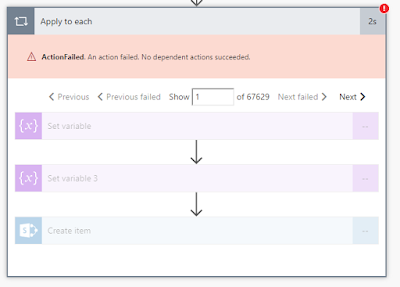
What Had a situation where I was pulling back 70,000 items in an array from a REST API call.  I wanted to create a SharePoint item for each of the items in an array, however the 'Apply To Each' action kept giving me the following error: ActionFailed . An action failed. No dependent actions succeeded. Why This was due to a Microsoft Flow limitation. When you are using the Free Version of MS Flow you are limited to 5,000 items in a loop .  Explained here:  https://docs.microsoft.com/en-us/flow/limits-and-config Workaround I tried my best to come up with a workaround, tried splitting up the array into batches of 5,000.  All to no avail.  in the end, gave up, and saved the array of items to a CSV and saved the CSV in a SharePoint Library instead. body('Parse_JSON')?['applist']?['apps'] The only other alternative I could come up with is to grab the 'first 4999 items' from the array, which does work with an expression like this: ...