Posts

Showing posts with the label power

SVG Icons for Power Apps - Find any icon you'll ever need

Image
Reference Material How to put SVG code in an image object:  https://www.matthewdevaney.com/svg-images-in-power-apps/#How-Do-I-Add-SVG-Icons-To-Power-Apps Figma - Microsoft Office Icons: https://www.figma.com/community/file/1109502320071552607 Figma - 1600 free icons: https://www.figma.com/community/file/886554014393250663/Free-Icon-Pack-1600%2B-icons Figma - Adobe Icons: https://www.figma.com/community/file/834829738797323395/Adobe-Icons   Steps Step 1: Search figma for icons (some examples above) Step 2: Copy icon as SVG Step 3: Paste SVG code in notepad and Replace all " with ' Step 4: Paste into image object in Canvas app "data:image/svg+xml;utf8, "&EncodeUrl(" SVG CODE YOU ADJUSTED IN NOTEPAD ")
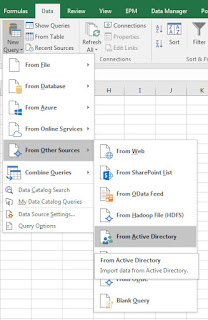
Export Group Membership From Active Directory Using Power Query

Image
If you need to export a list of staff from an Active Directory Group, follow these steps.  Allows you to gather all the names & usernames of staff in a particular group and save the information into Excel. Step By Step How To: Open up Excel > Power Query Tab Click From Other Sources > From Active Directory: (In Excel 2016 this is found under: Data Tab > New Query > From Other Sources > From Active Directory) screenshots from Excel 2016 on left, Excel 2010 w/ Power Query Add-on right A popup will ask you to enter your domain name.  It should already be populated with the correct information but if not, input your companies domain name & Click OK: In the Navigator that opens up, expand your domain tree and double click group: You should now see a list of all groups in Active Directory in the Power Query Editor: In order to find & filter for a specific Group, Click the Down-Arrow for the 'distinguishedName' column > ...