Posts

Showing posts with the label powershell

Deleting an Office 365 Group Deletes your Yammer Group
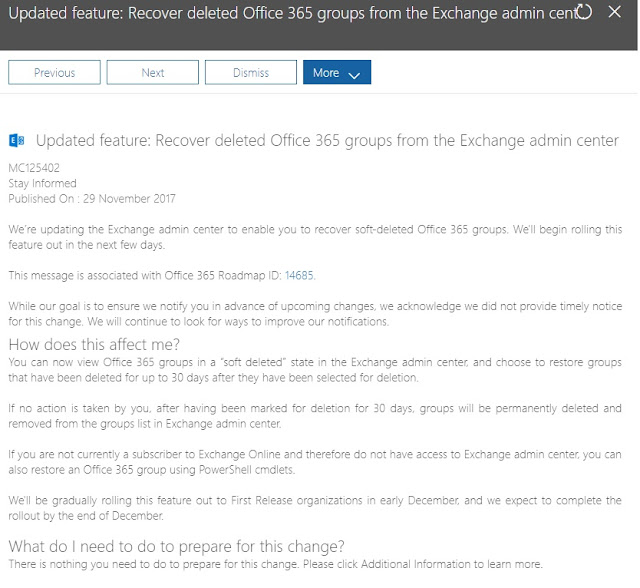
Image
Even if the Yammer Group was created first... So yeah, don't delete O365 Groups unless you want everything gone. If you need to recover: ##Do this off Network with regular powershell opened as Administrator Import-Module AzureADPreview Connect-AzureAD Get-AzureADMSDeletedGroup | Out-GridView Restore-AzureADMSDeletedDirectoryObject –Id xxxxxxxxxxxxxxxxxxxxxxxxxxxxxxx Get-AzureADGroup –ObjectId xxxxxxxxxxxxxxxxxxxxxxxxxxxxxxxx Update - 08/12/2017 Microsoft are rolling this restore functionality into Exchange Online over the next month or two, so you wont need the script above soon:

SharePoint Online - Retrieve the Permission Mask Values for a Site using Powershell

This article stems from another article explaining how to [[Automate Site & Group Creation with Nintex Workflow O365]] - Coming Soon What Use Powershell to retrieve detailed data about the permission levels on a particular site Why I had previously created a Nintex Workflow to Automate Site & Group creation using nintex workflow on SharePoint 2010 .  I needed to recreate the same workflow in SharePoint Online / Nintex Workflow O365, however the SharePoint 2010 script for retrieving Permission Mask values did not work. How Using Powershell 3.0 or later, and SharePoint Online Powershell Module.  Open up the SharePoint Online Powershell Module and paste the following code (after updating the variables at the top for your site and admin details): # SharePoint Online - Retrieve the Permission Mask Values for a Site using Powershell # Specifies variable $AdminURI = "https://company-admin.sharepoint.com" $RootSiteCollection="https://company.sharepoint.co...

SharePoint 2010 - Retrieve the Permission Mask Values for a Site using Powershell

This article stems from another article explaining how to  Automate Site & Group Creation with Nintex Workflow 2010 What Use Powershell to retrieve detailed data about the permission levels on a particular site Why I was looking for a way to automate Site & Group creation using nintex workflows.  In order to create groups, you need to call a SharePoint Web Service.  That Web Service requires an input value called 'permissionMask (int)'. This powershell script will allow you to find the correct permission Mask related to your particular environment & permission levels. How Jump onto your WFE, open up SharePoint Powershell as admin and paste in the following code (with the site you wish to retrieve data for: ## Get site permissions using SharePoint 2010 web service in powershell $uri=" http://rootsite/subsite /_vti_bin/Permissions.asmx?wsdl"  ## $siteName is a string which contains the site name for which you need to get the permissions [St...

Office 365 - SharePoint Online: Run a Report to List Your SharePoint Service Administrators

Image
What I've begun setting up the governance model for SharePoint Online and was working out the best way to ensure when I give someone SharePoint Administration Access that they automatically have full access to administer every Site Collection. My method is to use the 'SharePoint Service Administrator' Group.  This is the group that you are added to when your O365 User Account is assigned the 'SharePoint Administrator' Role. Why My reasoning is that way when a staff member joins the team you only need to get them added to one spot and they are good to get on with the work. Problem Occasionally you will want to check that the right staff have access.  How do you report on who is a member of that group!?  I searched high and low to no avail.  When that fails, there's only one choice...  Powershell. Here's the script you need to run in order to bring back a list of every user that has been given SharePoint Adminstrator Access: #Connection to Off...

Connect to Exchange Online via Powershell & Allow File Types

##RUN POWERSHELL AS ADMINISTRATOR ##Use this when you need to make configuration changes to your Exchange environment that can't be done via the GUI ##Connect to Exchange Online via Powershell Set-ExecutionPolicy RemoteSigned $UserCredential = Get-Credential $Session = New-PSSession -ConfigurationName Microsoft.Exchange -ConnectionUri https://outlook.office365.com/powershell-liveid/ -Credential $UserCredential -Authentication Basic -AllowRedirection Import-PSSession $Session ##How to Allow File Types to be opened in Exchange Online Get-OwaMailboxPolicy OwaMailboxPolicy-Default | Select -ExpandProperty BlockedFileTypes | Sort Get-OwaMailboxPolicy OwaMailboxPolicy-Default | Set-OwaMailboxPolicy -BlockedFileTypes @{Remove = ".xml"} Get-OwaMailboxPolicy OwaMailboxPolicy-Default | Set-OwaMailboxPolicy -AllowedFileTypes @{Add = ".xml"} Get-OwaMailboxPolicy OwaMailboxPolicy-Default | Set-OwaMailboxPolicy -BlockedMimeTypes @{Remove = "text/xml...

SharePoint 2010 - Powershell Script to Disable Versioning on a specific List & Delete Old Versions

This will remove versioning from the list you specify & update every item so that the old versions are deleted. Great for really large lists/libraries that don't require versioning when you want to free up some space. $web = get-spweb "http://root/site" $list = $web.Lists["List Name"] $list.EnableVersioning = $false $list.Update() foreach($item in $list.Items) { $item.URL; $item.SystemUpdate(); }

SharePoint 2010 - People Picker that is showing the wrong user profile information

Hi again, introduction to this issue:  Someone has updated information on their MySite but their details have not propagated through to the People Picker, or any list that shows User Information in it. Why:  This is due to the User Information List , which is used to supply User Information to all the SharePoint functions that use it.  The User Information List only seems to get updated when a user is first introduced to a Site Collection.  Not even a full Profile Sync will fix it. (You can find the User Information List here: http://[rootsite]/_layouts/people.aspx?MembershipGroupId=0).  This issue has been documented before and done very nicely on Gary's blog here:  http://blog.falchionconsulting.com/index.php/2011/12/updating-sharepoint-2010-user-information/ The difference is between Gary's blog post and mine, is that his shows how to get a script to iterate through every Web Application and update specific fields.  Where as I will be sh...