Posts

Why we need to stop & think

https://plus.google.com/photos/+GoogleEarth/albums/5875822979804092129

SharePoint 2010 - When [Today] just isn't your day

Sometimes your SharePoint environment doesn't want to play ball with OOTB features, so if you like me have once had an issue with the [Today] option not working on list filters, here is the slower but successful way of getting it to work: Create the view using CAML Query in SharePoint Designer 2010. The CAML equivalent of [Today] is: <Value Type="DateTime"><Today/></Value> Or if you want to be a few days ahead or behind today <Value Type="DateTime"><Today OffsetDays="-31"/></Value> Cheers, The Baretta

SharePoint 2010 - List View Threshold

Image
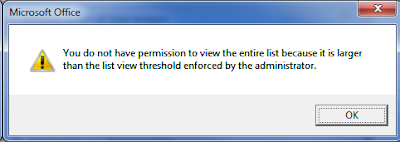
Any well utilised SharePoint farm will hit this limit at one point or another, the annoying but not hard to resolve LIST VIEW THRESHOLD ISSUE!!!!!! If you're on the ball, you'll know to cater for this when first creating a list you know is going to be quite popular with the lads.  This involves creating indexed columns, and creating views that filter on the indexed columns. But woe to those who wait for the dreadful message to appear, and also to those who prepared for it, but it is still occurring anyway.   WHHHHHHYYYYYYYYYYYYYYYYYYY!!!!!!!!!!!!.... STOP!  CAML TIME! Well it's because when you modify a view using the SharePoint GUI, and you filter on a indexed column and maybe a few others, SharePoint turns your filters & options into a CAML query, and if that query contained a few different column filters, SharePoint occasionally doesn't render the CAML query in a manner that ensures you are always querying less than the List View Threshold! OH N...
SharePoint 2010 - CSS & JS Across Multiple Web Applications

An issue I came across the other day involved creating a web application with the look & feel as another web application on the SharePoint 2010 Farm. I decided to link all the CSS from the second Web Application to the first Web Application, which works fine for the majority of functions (background, colours, images, page width, etc). Here's what was failing for me, and the only workaround was to make a copy of the CSS on both Web Applications: Certain JQuery & Javascript files failed to render Custom Markup Styles in the Ribbon failed to appear Moral of the story, Don't point Master pages to another Web Applications CSS & JS files.  Make a copy of them on each Web App

SharePoint 2010 - SQL Server 2012 Reporting Services Integration Steps (Multiple Server Farm)

Most SharePoint customers suffer no issues when integrating SQL Server Reporting Services 2012 (SSRS 2012) with SharePoint 2010 (SP 2010), I however, had quite a bit of trouble.  So for those at home who may also be having some trouble, I thought I'd prescibe you some troubleshooting medicine along with a few spoonfuls of errors. The official steps you may have read about: - Install SQL Server with Reporting Services Add-in for SharePoint - Install SharePoint on the Reporting Services Server and connect that server up to the farm (using Configuration Wizard) - Install the rsSharePoint.msi file provided by Microsoft on all your front-end servers running SharePoint. - Run these two commands on all front-end servers running sharepoint Install-SPRSService Install-SPRSServiceProxy - Navigate to Central Administration > System Settings > Manage services on server.  Start the SQL Server Reporting Services Service - Navigate to Central Administration > Applic...

SharePoint 2010 Enterprise Features & CALS

You've just been told that despite having a SharePoint 2010 Enterprise licence, your users also need a Standard CAL + Enterprise CAL.  Shit! Step 1:   Review whether you use any enterprise features.  and if so, review which sites you need them to stay if any.   http://sharepoint.microsoft.com/en-us/buy/Pages/Editions-Comparison.aspx What do all those features enable exactly??  Infopath Forms Services might not mean that you can't use Infopath with SharePoint if you dont have enterprise, it may simply mean that you can't use Infopath INSIDE a browser.  So if your users have InfoPath installed on their local computer, then it's not an issue disabling Enterprise features. Step 2:  If you don't need Enterprise features, and need to disable them because of licensing issues: Disable in Central Admin:  Manage Web Applications > Manage Features > Deactivate  SharePoint Server Enterprise Web application features on each Web Application....

SharePoint 2010 - RSS Viewer Web Part - Customise the style

For the last few days I've been looking for an example on how to customise SharePoint 2010's OOTB RSS Viewer Web Part, and finally I've found a solution that although it has quite a few steps, the final result is clean code with the ability to use CSS to style the Feed. http://zioed.wordpress.com/2012/02/24/customizing-the-sharepoint-2010-rss-viewer-web-part-part-1-of-a-two-part-post-2/ Thank you Ed. To add to Ed's fantastic post, I will show you a method to create styled RSS feeds without SharePoint Designer.  Once you have found an RSS feed that you would like to manipulate, add the URL to your RSS Viewer Web Part (If you cannot find it in your list of web parts, you need to enable the SharePoint Server Standard Site Collection feature), click Apply, then click the 'XSL Editor...' button.  Copy all of the code into Notepad for ease of editing, and paste it back into the XSL Editor when you are finished. The section of XSL you are looking for is with...