Posts

Showing posts with the label users

SharePoint Online - Hide External Users from Global Search Results

Image
Had a problem where external users (people outside our organisation who had been provided with an anonymous link to OneDrive/SharePoint Documents) were showing up in SharePoint's People Search Results. This article explains how to fix:  https://englando.wordpress.com/2015/07/24/hiding-users-from-office-365-sharepoint-global-search-results/ Basically you need to add a Query Rule to SharePoint's 'Local People Results' Search Query to block out results that contain the external users. I personally filtered out all results where a persons Username contained ' #EXT#' , which is what gets appended in Office 365 whenever an external user is given access to a document.
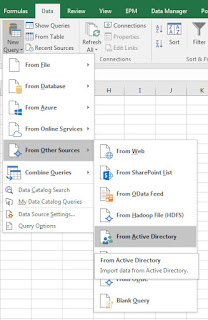
Export Group Membership From Active Directory Using Power Query

Image
If you need to export a list of staff from an Active Directory Group, follow these steps.  Allows you to gather all the names & usernames of staff in a particular group and save the information into Excel. Step By Step How To: Open up Excel > Power Query Tab Click From Other Sources > From Active Directory: (In Excel 2016 this is found under: Data Tab > New Query > From Other Sources > From Active Directory) screenshots from Excel 2016 on left, Excel 2010 w/ Power Query Add-on right A popup will ask you to enter your domain name.  It should already be populated with the correct information but if not, input your companies domain name & Click OK: In the Navigator that opens up, expand your domain tree and double click group: You should now see a list of all groups in Active Directory in the Power Query Editor: In order to find & filter for a specific Group, Click the Down-Arrow for the 'distinguishedName' column > ...